Keeping Data
Keeping Data
Running a server straight out of a generated server pack is normal, and it means that directory stops being ServerPackCreator's: it fills up with a world, an ops.json, a server.properties you tuned. Generating again over the top of it must not cost you any of that. Two settings decide what happens, and Update Server Packs is the one you want.
Updating Server Packs
Enable Update Server Packs. Nothing else needs changing -- it takes precedence over Overwrite Server Pack, so you can leave that at its default.
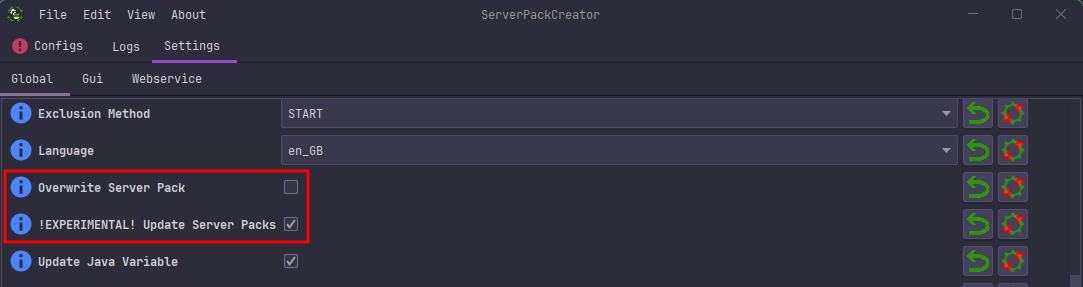
From the commandline:
An update is only possible where a previous run left its manifest.json behind, which is the record of what ServerPackCreator produced. With that record in hand it:
removes files the previous run produced which your modpack no longer contains, so a mod you dropped does not linger and a renamed mod jar does not end up in the pack twice,
refreshes everything the modpack still contains,
leaves alone everything the manifest never mentioned -- your world, your
ops.json, your ban-lists, anything you added yourself,and never touches a protected path, even one it did produce.
Pruning happens after the new files are copied, so a generation that fails part-way leaves a server pack you can still start a server from rather than a gutted one. A run that copies nothing at all is treated as a broken run and prunes nothing.
Protected paths
de.griefed.serverpackcreator.serverpack.update.protected lists what an update must never delete or overwrite, relative to the server pack. A directory covers everything inside it. The defaults are what a Minecraft server writes into the directory it is started from, plus the two files you are most likely to have edited by hand:
world, world_nether, world_the_end, ops.json, whitelist.json, banned-players.json, banned-ips.json, usercache.json, eula.txt, logs, crash-reports, server.properties, variables.txt
Your own entries are added to that list, never substituted for it, so you can widen the protection but cannot accidentally leave your own world unprotected. If you do want a protected file regenerated, either disable Update Server Packs for that run, or simply delete the file and let the next run write it fresh.
Protection applies to a file that is already there. A first generation still ships a server.properties, a variables.txt or a world included from your modpack; it is only updates over the top of them that leave them be.
What ends up in the ZIP-archive
The archive of an updated server pack leaves out anything protected that ServerPackCreator did not produce -- your world, your ban-lists, your ops.json-- so an archive you upload to Modrinth or CurseForge does not carry your server's data with it. server.properties, variables.txt and the start scripts are archived, because a server pack without them is not a server pack; note that means an archive built from an updated pack carries your copies of those two files, so check them before sharing it.
Keeping data without updating
You can instead disable Overwrite Server Pack and leave Update Server Packs off. Nothing is then deleted or overwritten at all, except scripts, icon and properties.
Be aware of what that costs: because nothing is ever refreshed or removed, a mod that changed version between generations lands in the pack beside its older copy, and a server with two versions of the same mod will not start. It also means any ZIP-archive generated this way may contain data which is not allowed on platforms such as Modrinth or CurseForge. Update Server Packs exists precisely to keep your data and converge on your modpack; prefer it.
Make backups regardless. No amount of care here replaces a copy of a world you would be sad to lose.